
Skip to content

Buyer tools

· ★ Only on BTB · Advanced · $29 / mo

Quote Form (Request a Quote)

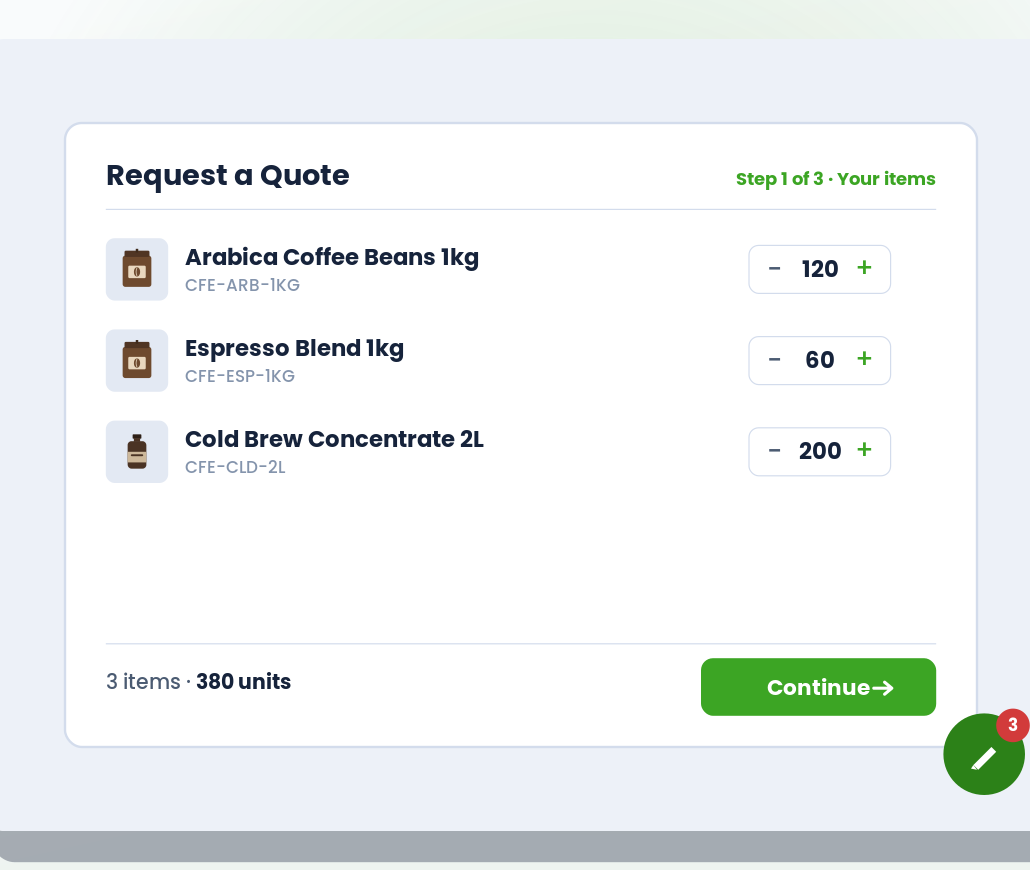
Buyers add products to a separate quote cart, fill a 3-step Cart → Info → Review wizard with per-item notes, and submit. Requests land in your admin inbox with a reference number and a pending → reviewed → quoted → accepted status workflow.

Live

What it does

Quote Form (Request a Quote) at a glance.

  • Buyers request custom prices via a 3-step form on the storefront

  • Every request lands in your admin inbox with a reference number

  • Status workflow: pending → reviewed → quoted → accepted

  • Gate the button to specific customer tags or lifetime spend

See it working

What buyers see. What you configure.

Storefront on the left. Admin on the right. Same feature, two perspectives.

Storefront — what buyers see
Live
Quote Form (Request a Quote) — storefront view

Admin — what you configure

BTB rule
app/btb/quote-request
Live
Inbox · 3 open today
QR-1042

Alex Chen · Acme Wholesale

Ceramic Dinner Set (12) · custom label

Pending
QR-1041

M. Kumar · Kumar Trading Co.

Coffee Beans (200 lbs) · net 30 request

Quoted
QR-1040

Diego Suárez · Marina Foods

Assorted case pack · new customer

Accepted

vs. Shopify B2B native

Where this stands against native.

Shopify B2B native

Shopify B2B doesn’t ship a storefront quote workflow at any plan. Buyers email; deals cool in your inbox.

BTB

Storefront Quote Form with a 3-step wizard, per-item notes, and an admin inbox with reference numbers + a pending → reviewed → quoted → accepted status workflow.

Setup

Live in 3 steps.

All configured from the BTB dashboard — no code, no theme edits for the common case.

  1. 01

    Configure the Quote Form

    Open the BTB Quote Form admin. Pick cart-icon display type (floating, sticky side, header injection, or disabled), customize button text/colors, set page scope (PDP, collection, search, home, cart).

  2. 02

    Pick customer targeting (optional)

    Apply to all customers, customers with a tag, or customers above a spend threshold. Anonymous + tagged buyers see Request Quote; retail buyers see normal Add to Cart.

  3. 03

    Customize the 3-step wizard + form fields

    Pick which fields to show on the Info step (email always required; phone, company, address, message optional). Save — submissions land in your admin inbox with their own reference number.

Common use cases

How merchants use Quote Form.

  • Setup

    Custom-quote catalog

    For premium products where price varies per buyer — hide "Add to Cart", show "Request Quote".

  • Setup

    High-ticket B2B

    Bespoke industrial or commercial equipment where every deal needs sales-team input.

  • Setup

    Restaurant bulk orders

    Chefs request quotes for weekly kitchen supplies with negotiable pricing per volume.

FAQ

Common questions

How does the Quote Form wizard work?
Buyers add products to a quote cart (separate from the real cart — no checkout). When they're ready, they tap Request Quote and walk through three steps: confirm items + add per-item notes → fill contact and optional shipping info → review and submit. The submission lands in your BTB admin inbox with a QR-XXXX reference number.
Where does the Quote Request button appear on my store?
You pick. The quote-cart icon supports four display styles — floating in a corner, a sticky side tab, injected into your header next to your cart icon, or off. The Request Quote button sits next to the Add to Cart button on product pages and other product surfaces; you choose which page types it shows on (PDP, collection, search, home, cart, quick-view).
Can I gate the Quote button to specific customers?
Yes. Apply to all customers, customers with one or more specific tags (comma-separated list), or customers above a lifetime-spend threshold. Anonymous visitors are excluded when tag or spend conditions are set.
Does BTB email the buyer or me when a quote is submitted?
Right now, no — the new request lands in your BTB admin inbox and the buyer sees a confirmation screen with their QR-XXXX reference number. An Email Customer button in the admin opens a pre-filled email reply so you can respond in one click. Automated email is on the roadmap.
Does this work on every Shopify plan?
Yes. BTB works on Basic, Grow, Advanced, and Plus — the same underlying platform BTB is built on.
Do I need Shopify B2B Companies to use this?
No. BTB targets customers by tag on the regular Shopify storefront — no Companies, no separate B2B checkout. If you also use Shopify B2B, BTB layers on top.
Which BTB plan includes Quote Form?
Quote Form ships on the Advanced plan ($29 / mo). Both plans include a 7-day free trial.