
Skip to content

Order rules

· ★ Only on BTB · Growth+ · Advanced adds cart-level

Order Limits

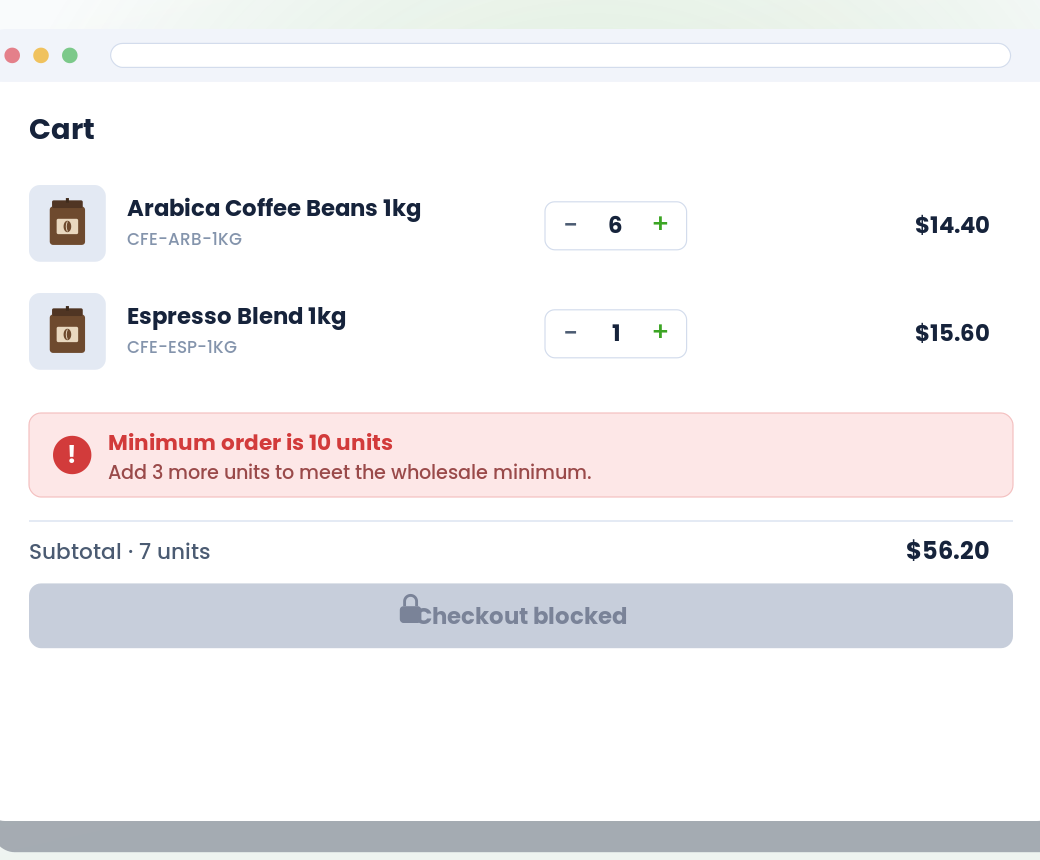
One feature, four rule types: per-product min / max, per-collection (total or per-product), cart-wide quantity, and cart-wide amount. Customer targeting by tag, lifetime spend, or order count. Clear in-cart messaging so buyers always see "Add 5 more units" instead of a generic error.

Live

What it does

Order Limits at a glance.

  • Four rule types: per-product, per-collection, cart-quantity, cart-amount

  • Inline cart message shows exactly how much more to reach the minimum

  • Apply by customer tag — different minimums for different buyer groups

  • Enforced at checkout too — buyers can't slip through undersized orders

See it working

What buyers see. What you configure.

Storefront on the left. Admin on the right. Same feature, two perspectives.

Storefront — what buyers see
Live
Order Limits — storefront view

Admin — what you configure

BTB rule
app/btb/order-limits
Live
Rule type
Product Collection Cart qty Cart amount
Min amount $500.00
Customer
Tag wholesale
Message "Add ${remaining} more to reach the wholesale minimum."

vs. Shopify B2B native

Where this stands against native.

Shopify B2B native

Native quantity rules are per-product only. Cart-wide quantity or amount limits require writing a Shopify Function (developer time).

BTB

Four rule types in one feature: per-product, per-collection, cart-quantity, cart-amount. Customer condition by tag, spend, or order count. Inline cart-page messaging with live remaining-count guidance.

Setup

Live in 3 steps.

All configured from the BTB dashboard — no code, no theme edits for the common case.

  1. 01

    Pick a rule type

    Four cards in the create flow: per-product, per-collection, cart-quantity, cart-amount. Each has its own form. Start with one type; add more rules later.

  2. 02

    Set min / max + targeting

    Set the numeric thresholds. Customer condition: all customers, tagged, by lifetime spend, or by order count. Choose whether the rule applies to guest visitors.

  3. 03

    Customize the cart message

    Write your own message with live variables (remaining units, cart total, product name, and more). Toggle "Show in cart" so buyers see the violation on the cart page + drawer, not just at checkout.

Common use cases

How merchants use Order Limits.

  • Setup

    Wholesale minimums

    $500 minimum on the cart for wholesale-tagged buyers, no minimum for retail.

  • Setup

    Case-pack enforcement

    Buyers must add products in multiples of 12 (or 24, or 48) — no random loose units.

  • Setup

    Territory caps

    Buyer's tag decides their max order size — different limits per distributor group.

FAQ

Common questions

What's the difference between Order Limits and MOQ?
Both restrict what a buyer can order, but they're applied differently. Order Limits is a cart-level rule applied by customer condition — best when the rule is about who's buying ('wholesale customers need a $500 minimum'). MOQ lives on the product, vendor, or variant itself — best when the limit is intrinsic to the item (case packs, pallet quantities).
Can I block undersized orders at the cart level?
Yes — that's what the cart-quantity and cart-amount rule types do. Set a minimum (and/or maximum) total units or dollar value across the entire cart. Checkout is disabled with a clear message until the buyer complies.
Where do violation messages appear?
Always at checkout — the cart is blocked from progressing. Optionally also on the cart page and cart drawer when you toggle 'Show in cart' on the rule. Pick inline (the message renders inside your cart) or modal (a popup appears with a configurable title and close button).
Can I make rules apply only to wholesale customers?
Yes. Customer condition supports: all customers, customer with a specific tag, lifetime-spend threshold, or customer-orders-count threshold. When you set a condition other than 'all', you can also choose whether the rule applies to guest visitors.
Does this work on every Shopify plan?
Yes. BTB works on Basic, Grow, Advanced, and Plus — the same underlying platform BTB is built on.
Do I need Shopify B2B Companies to use this?
No. BTB targets customers by tag on the regular Shopify storefront — no Companies, no separate B2B checkout. If you also use Shopify B2B, BTB layers on top.
Which BTB plan includes Order Limits?
Order Limits ships on the Growth+ plan (Advanced adds cart-level). Both plans include a 7-day free trial.