
Skip to content

Buyer tools

· ★ Only on BTB · Growth · $8.99 / mo

Quick Order Form

Drop a search + cart + product-table form onto any page — typically a dedicated /quick-order page. Buyers type quantities into rows and add the whole cart in one click. Plus a Shopify Plus variant that lives inside the customer account portal.

Live

What it does

Quick Order Form at a glance.

  • Dedicated bulk-add page with search, filter, and inline quantities

  • Fill a 50-SKU cart in under a minute — no clicking through product pages

  • Restrict access by customer tag so only wholesale buyers see it

  • Two surfaces — public page or Shopify Plus customer-account portal

See it working

What buyers see. What you configure.

Storefront on the left. Admin on the right. Same feature, two perspectives.

Storefront — what buyers see
Live
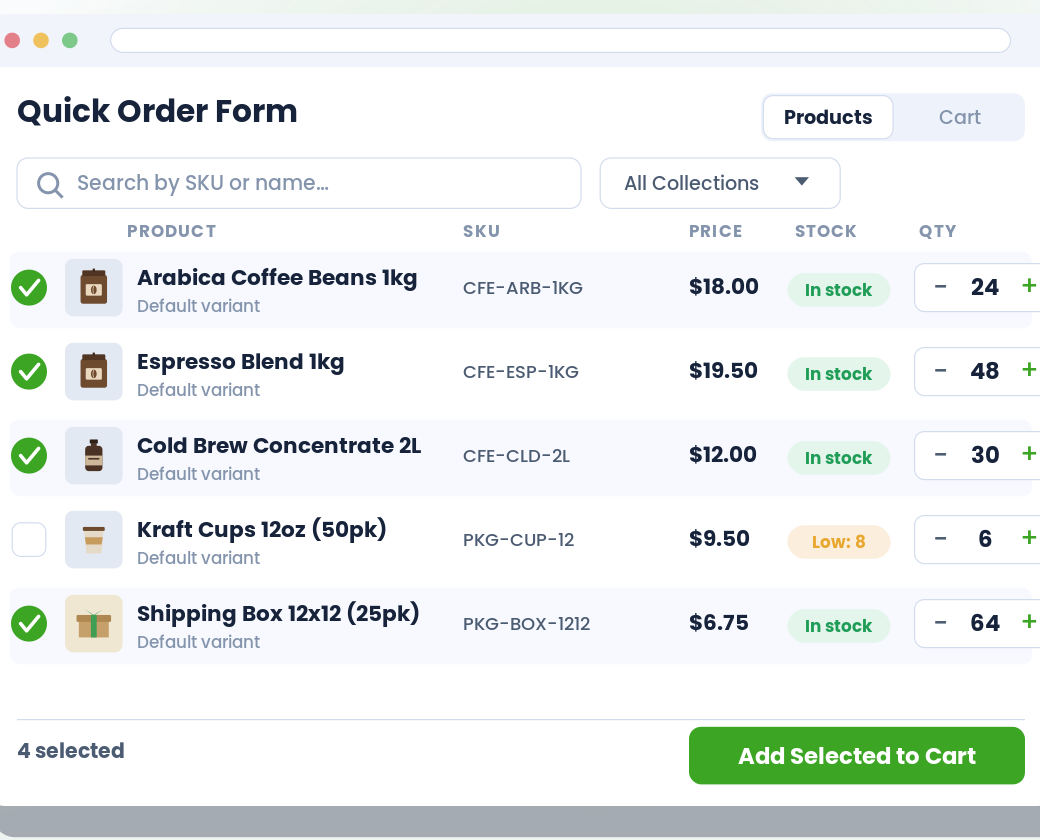
Quick Order Form — storefront view

Admin — what you configure

BTB rule
app/btb/quick-order-form
Live
Bulk cart · 4 items $2,148.00
SKU Name Qty
BTB-001 Tee · Black M 12
BTB-002 Tee · Black L 24
BTB-003 Hoodie · Cream 48
BTB-004 Cap · Green 36
Add selected to cart

vs. Shopify B2B native

Where this stands against native.

Shopify B2B native

Not shipped at any plan. Wholesale buyers click through every product page or email a SKU + qty CSV.

BTB

Drop a search + cart + table form onto any page — typically /quick-order — so buyers fill 50-SKU carts in under a minute. Plus a Shopify Plus variant inside the customer account portal.

Setup

Live in 3 steps.

All configured from the BTB dashboard — no code, no theme edits for the common case.

  1. 01

    Configure the form

    Set primary color, button label, search/cart tab labels, page size (default 20), sort options, and which columns to show (image, SKU, variant, price, stock).

  2. 02

    Pick checkout mode + customer access

    Storefront mode (recommended — bypasses theme cart quirks) or AJAX mode (integrates with your theme cart drawer). Customer targeting via a Customer Group or by condition (tag list / spend). Leave open or restrict to wholesale tags.

  3. 03

    Drop it on a page

    Add the BTB Quick Order Form block to any page in the theme editor — typically a dedicated /quick-order page. On Shopify Plus, you can also enable the variant that lives inside the customer account portal.

Common use cases

How merchants use Quick Order Form.

  • Setup

    Wholesale reorder portal

    Existing buyers reorder their usual mix in under a minute instead of browsing.

  • Setup

    Restaurant weekly ordering

    Kitchen managers add 30-50 SKUs at set quantities every Monday.

  • Setup

    Distributor bulk carts

    Trade buyers who know their SKUs and just want to type in quantities and check out.

FAQ

Common questions

How does the buyer use the Quick Order Form?
They land on the page where you've embedded it. The form shows Products and Cart tabs, a search input, optional collection filter, and a product table with image, name, SKU, variant select, price, stock, and a quantity input per row. They type quantities directly into rows, then hit 'Add Selected to Cart' at the bottom — 50 SKUs in under a minute is normal.
What's the difference between the storefront form and the Customer Account portal version?
The storefront form (every plan) lives on a page you pick — typically /quick-order — and is gated by customer condition. The Customer Account version (Shopify Plus only) lives inside the logged-in customer's account portal as a dedicated page. Same idea, two surfaces — use one or both.
Can I restrict the form to wholesale customers?
Yes. Set a customer condition: all customers / customer with one or more specific tags (comma-separated) / lifetime-spend threshold. Guests fail tag and spend conditions. You can also pick from the centralized Customer Groups table for reusable targeting.
Which checkout mode should I pick?
Storefront mode (recommended) bypasses theme cart quirks and sends the buyer straight to checkout. AJAX mode integrates with your theme's existing cart drawer and supports auto-switch-to-cart-on-add. Pick AJAX if your theme has a custom cart drawer you want to keep using.
Does this work on every Shopify plan?
Yes. BTB works on Basic, Grow, Advanced, and Plus — the same underlying platform BTB is built on.
Do I need Shopify B2B Companies to use this?
No. BTB targets customers by tag on the regular Shopify storefront — no Companies, no separate B2B checkout. If you also use Shopify B2B, BTB layers on top.
Which BTB plan includes Quick Order Form?
Quick Order Form ships on the Growth plan ($8.99 / mo). Both plans include a 7-day free trial.