app/btb/moq
Live Order rules
· Deeper than Shopify B2B · Growth · $8.99 / moMinimum Order Quantity (MOQ)
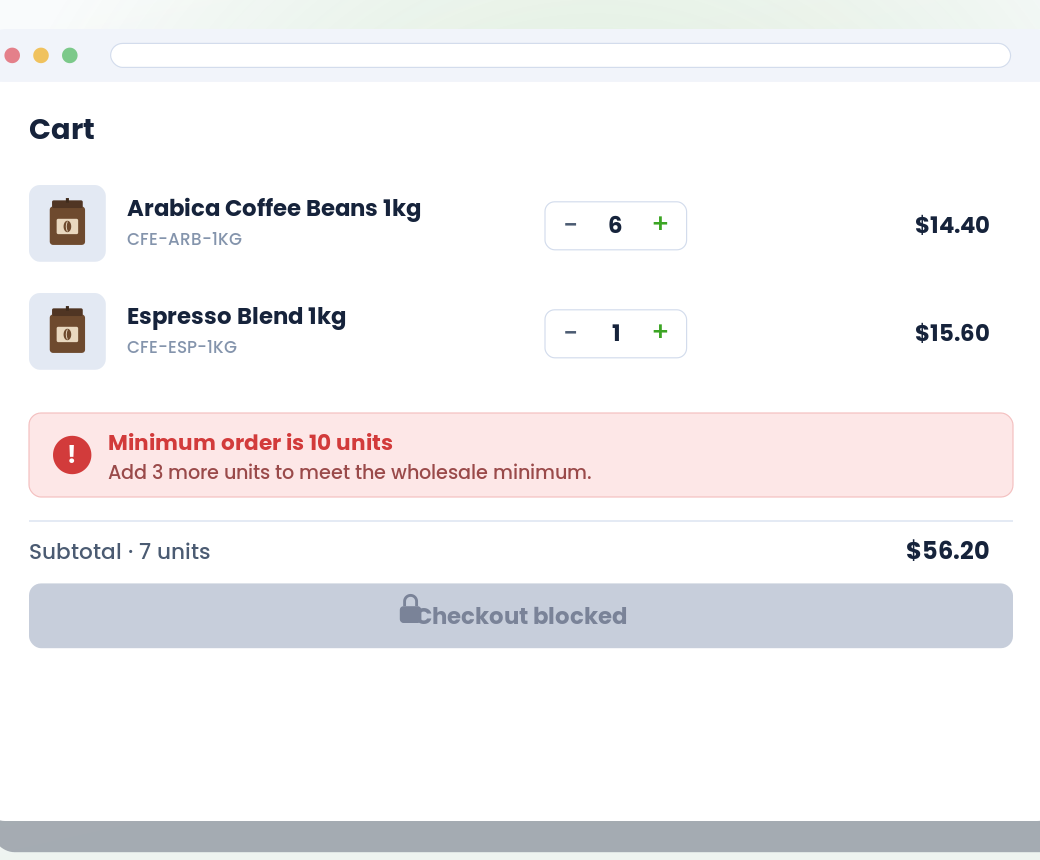
Set minimum, maximum, and multiples-of rules on individual products, variants, or entire vendors. Variant rules override product rules. Enforced on product pages, collection pages, search, cart, and quick-view — with a clear message and live remaining-count guidance.
What it does
Minimum Order Quantity (MOQ) at a glance.
-
Rules at vendor, product, or variant level — variant beats product
-
Enforced on product pages, collection, search, cart, and quick-view
-
Bulk-edit through Shopify's standard metafields CSV workflow
-
Set min, max, or "multiples of" quantities per rule
See it working
What buyers see. What you configure.
Storefront on the left. Admin on the right. Same feature, two perspectives.
Storefront — what buyers see
Admin — what you configure
app/btb/moq
Live vs. Shopify B2B native
Where this stands against native.
Shopify B2B native
Per-product quantity rules applied via Shopify B2B catalog. Tied to Companies. Enforcement mostly on product pages.
BTB
Set MOQ at vendor, product, or variant level — variant rules override product rules automatically. Enforced on product, collection, search, home, cart, and quick-view pages. Optional Collection Quick Add stepper.
Setup
Live in 3 steps.
All configured from the BTB dashboard — no code, no theme edits for the common case.
- 01
Pick a scope: vendor, product, or variant
Each scope has its own page. Pick where you want the limit to live — on a specific product, on a specific variant, or across every SKU from a given vendor.
- 02
Set MOQ values on each item
Per product or variant: minimum quantity, maximum quantity, and multiples-of. Per vendor: minimum and maximum dollar value plus quantity. Variant rules override product rules automatically.
- 03
Storefront behaviour
Choose how quantity steppers behave (auto / by 1 / by MOQ), whether the initial quantity auto-fills to the minimum, and which page types the rule shows on. Optional Collection Quick Add drops a qty stepper into product cards.
Common use cases
How merchants use MOQ.
- Setup
Per-vendor minimums
Buyers must order at least $250 or 24 units from each vendor per cart.
- Setup
Case-pack products
Wholesale coffee sold in cases of 12 — the product can only be ordered in multiples of 12.
- Setup
Product-level floor
Set a minimum of 6 units on a specific product — enforced on PDP, cart, and checkout.
FAQ
Common questions
What's the difference between MOQ and Order Limits?
Both restrict order sizes, but they're applied differently. MOQ lives on the product, vendor, or variant itself — use it when the limit is intrinsic to the item (case packs, pallet quantities, per-vendor minimums). Order Limits is a cart-level rule applied by customer condition — use it when the rule depends on who's buying (wholesale customer needs a $500 minimum).
What's the precedence between vendor, product, and variant?
Variant beats product. So if a specific variant has its own MOQ, that wins over the product's. If only the product has a MOQ, all variants inherit it. Vendor rules are evaluated separately and aggregate across every SKU from that vendor in the cart.
Where do MOQs enforce on the storefront?
Product pages — quantity inputs get the min and step values set automatically, +/− steppers honour the rule, and the buyer can't drop below the minimum. Collection pages, search, home, cart, and quick-view follow the same rules via Collection Quick Add. Max-quantity and value-based limits also enforce at checkout — buyers can't get around them in cart abandonment flows.
How do I set MOQs in bulk?
MOQs live on each product, variant, or vendor — so you can edit them inline in your Shopify admin, or bulk-export to CSV, edit in Excel, and bulk-import back via Shopify's standard bulk-operations flow. The BTB admin gives you a one-click default so you don't have to remember anything.
Does this work on every Shopify plan?
Yes. BTB works on Basic, Grow, Advanced, and Plus — the same underlying platform BTB is built on.
Do I need Shopify B2B Companies to use this?
No. BTB targets customers by tag on the regular Shopify storefront — no Companies, no separate B2B checkout. If you also use Shopify B2B, BTB layers on top.
Which BTB plan includes MOQ?
MOQ ships on the Growth plan ($8.99 / mo). Both plans include a 7-day free trial.
More in Order rules