
app/btb/b2b-discounts
Live Pricing
· Deeper than Shopify B2B · Growth · $8.99 / moB2B Discounts
Auto-apply discounts at checkout based on customer condition (tag, spend, etc.) and product scope (all / collection / specific products / tags). Combine percentage and volume tiers in one rule.
What it does
B2B Discounts at a glance.
-
Percentage, fixed-amount, or volume-tier discounts in one rule
-
Combine flat % + volume tiers inside a single rule (mixed mode)
-
Target by customer tag, spend threshold, or product / collection
-
Schedule discount windows and stack multiple rules by priority
See it working
What buyers see. What you configure.
Storefront on the left. Admin on the right. Same feature, two perspectives.
Storefront — what buyers see
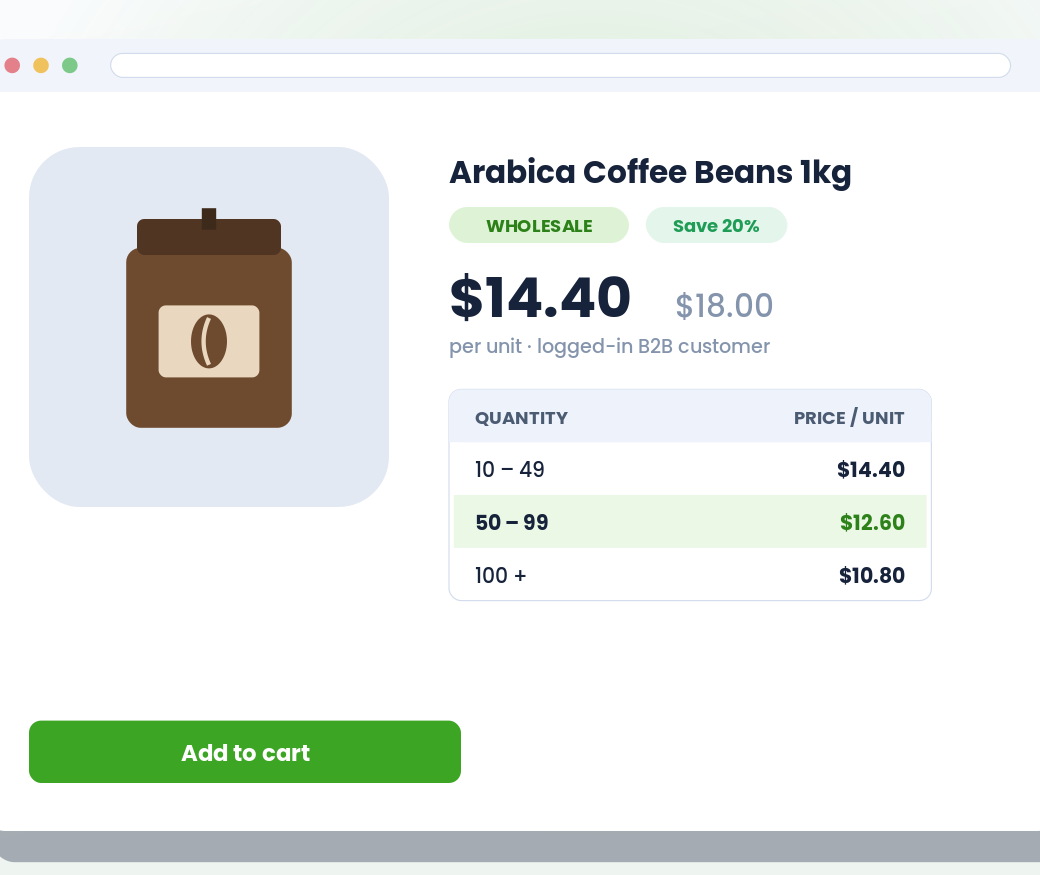
Admin — what you configure
app/btb/b2b-discounts
Live vs. Shopify B2B native
Where this stands against native.
Shopify B2B native
Shopify Functions can deliver this — but require writing code, deploying as a Function, and managing discount config in code.
BTB
UI-driven builder for percentage + volume tiers + mixed modes, customer targeting (tag / no-tag / spend), product targeting (all / collection / specific / tags) — all from the BTB admin.
Setup
Live in 3 steps.
All configured from the BTB dashboard — no code, no theme edits for the common case.
- 01
Pick discount type + targeting
Percentage, volume tiers, or both in one rule. Then product targeting: all products / a specific collection / specific products / by product tag.
- 02
Set customer condition
All customers / customer with a specific tag / customer without a tag / lifetime-spend threshold. Tag matching is case-insensitive.
- 03
Add volume tiers (optional)
Set quantity steps, each with a percentage or fixed-amount discount and an optional buyer message. The cart picks the best tier the buyer qualifies for based on total eligible quantity.
Common use cases
How merchants use B2B Discounts.
- Setup
Flat wholesale discount
10% off every product for anyone tagged "wholesale" — no code needed.
- Setup
Volume tier promo
5% off at 25 units, 10% off at 50 units, 15% off at 100 units.
- Setup
Mixed rule
Flat 10% off baseline + additional 10% off when the cart total is above $1,000.
FAQ
Common questions
What discount types are supported?
Three: percentage (% off, optionally with a minimum-purchase floor), volume tiers (each tier is percentage or fixed amount with its own buyer message), and mixed (both percentage AND volume tiers in the same rule). Mixed is the most common — flat 10% off across the board, plus a 50+ tier giving 20%.
How does customer targeting work?
Pick a condition: all customers / customer with a specific tag (case-insensitive) / customer without a specific tag / lifetime-spend threshold. Tag-based and spend-based conditions need a logged-in customer; without one, the discount won't apply.
Can I target different products per discount in the same rule?
Yes. Each percentage discount and each volume discount has an 'Apply to different products' toggle. When on, that discount uses its own targeting (collection / specific products / tags) independent of the rule's global targeting. Useful for combo rules — 'all wholesale customers get 10% off everything, plus 20% off a specific brand collection.'
How do I schedule a discount window?
Set a start and end date on the rule. The discount goes live on the start date and expires on the end date — no manual intervention needed.
Does this work on every Shopify plan?
Yes. BTB works on Basic, Grow, Advanced, and Plus — the same underlying platform BTB is built on.
Do I need Shopify B2B Companies to use this?
No. BTB targets customers by tag on the regular Shopify storefront — no Companies, no separate B2B checkout. If you also use Shopify B2B, BTB layers on top.
Which BTB plan includes B2B Discounts?
B2B Discounts ships on the Growth plan ($8.99 / mo). Both plans include a 7-day free trial.
More in Pricing